Know what needs a fix.
Know who’s on it.

Px3 runs automated checks across your PI inboxes and domains as you scale.
Catch the warning signs. Review the plan. Follow our team’s work.

A look inside Px31:15 / No sound needed

Demo with sample data. Case steps are shown on a shorter timeline. Read the demo transcript.

See if you qualify

A 45 min call with our team to see if Px3 fits your setup.

5 stars 5.0 on Trustpilot·Premium Inboxes

Rating checked September 5, 2026

Proactive checks. A clear next step.

“What’s broken?”
Now you have a place to start.

Three domains need replacing. Your team needs a clear plan.
See what our team found, what needs to happen, and who’s on it.

  1. 01

    Know what’s broken.

    Px3 runs scheduled checks and flags inbox and domain issues. Our team reviews the findings and shows you what needs attention.

  2. 02

    Know the next step.

    See the exact domains and inboxes, the replacement plan, and how we’ll check the work. Approve when needed.

  3. 03

    Know who’s on it.

    See what PI is handling and when your team has a next step. Follow the work and the checks in one place.

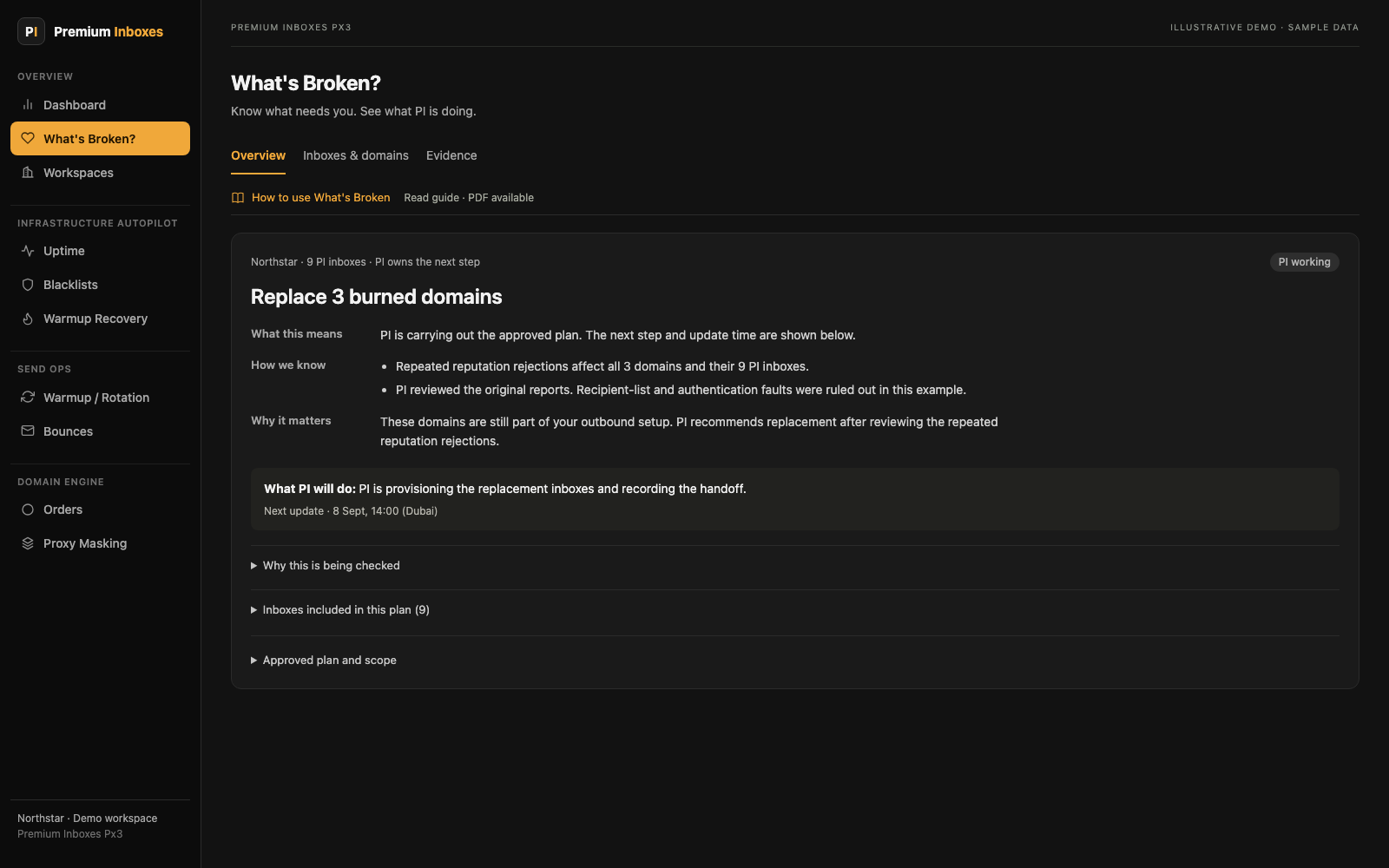
Px3 What’s Broken overview showing the next step, work PI is handling, and affected inboxes, with sample data
What needs you. What PI is handling.Open full view ↗

Know what needs to change

A burned inbox?
Or a burned domain?

You shouldn’t have to guess. See when an inbox needs a rebuild or the whole domain needs to be replaced.

Review the plan. See who owns the next step. Follow the work and the checks that come after it.

An example Px3 replacement case for 3 burned domains and 9 PI inboxes, with PI working on the approved plan
Follow each case through the work.Open full view ↗

The people behind the portal

Teams that send at scale.
In their own words.

Reviews of Premium Inboxes, the team behind Px3.

Read all reviews
5 out of 5 stars

Hundreds of domains

“I have used Premium Inboxes for hundreds of domains at this point … they were extremely quick in resolving the problem.”
5 out of 5 stars

210 inboxes across Google & Outlook

“Premium was STELLAR. I had 210 inboxes setup through them with a 50/50 Google/Outlook split.”
5 out of 5 stars

Outbound for his team & clients

“Their support is super responsive and always helpful. They consistently go the extra mile whenever we need anything.”
5 out of 5 stars

Help with hard technical issues

“Richard goes deep on issues most providers wouldn't touch, and that level of care has been a difference-maker for our operations.”
5 out of 5 stars

B2B outreach for clients

“We work with Premiuminboxes now for over a year … We just added another campaign and got it rolling within days.”
5 out of 5 stars

All his clients on Premium Inboxes

“I have been using PI for the last one year. Support is great! I have all my clients are on PI.”

A closer look inside Px3

See the moving parts.
Keep the work in one place.

01 / Warmup & uptime

Which inboxes
need attention?

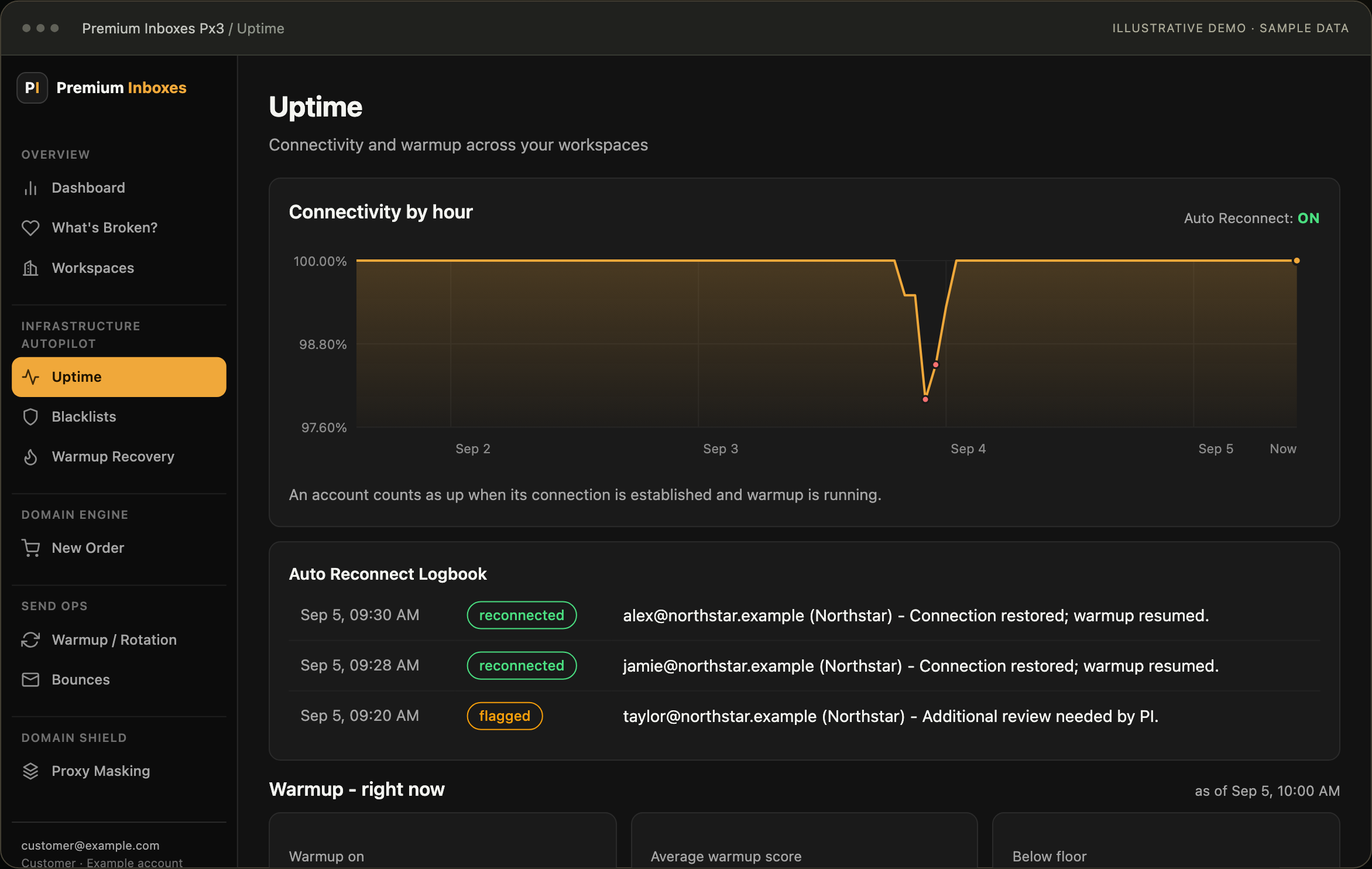
Px3 checks connection status and warmup scores on a schedule. See what dropped, what was tried, and what needs PI to take a look.

  • Scheduled checks across workspaces
  • Auto reconnect setup with PI
  • A log of attempts and results
Watch at 0:49
Px3 connection history chart, auto reconnect logbook, and warmup coverage with sample data
Connection history, warmup, and the logbook.Open full view ↗

02 / Rotation

Warm up. Send.
Rest. Repeat.

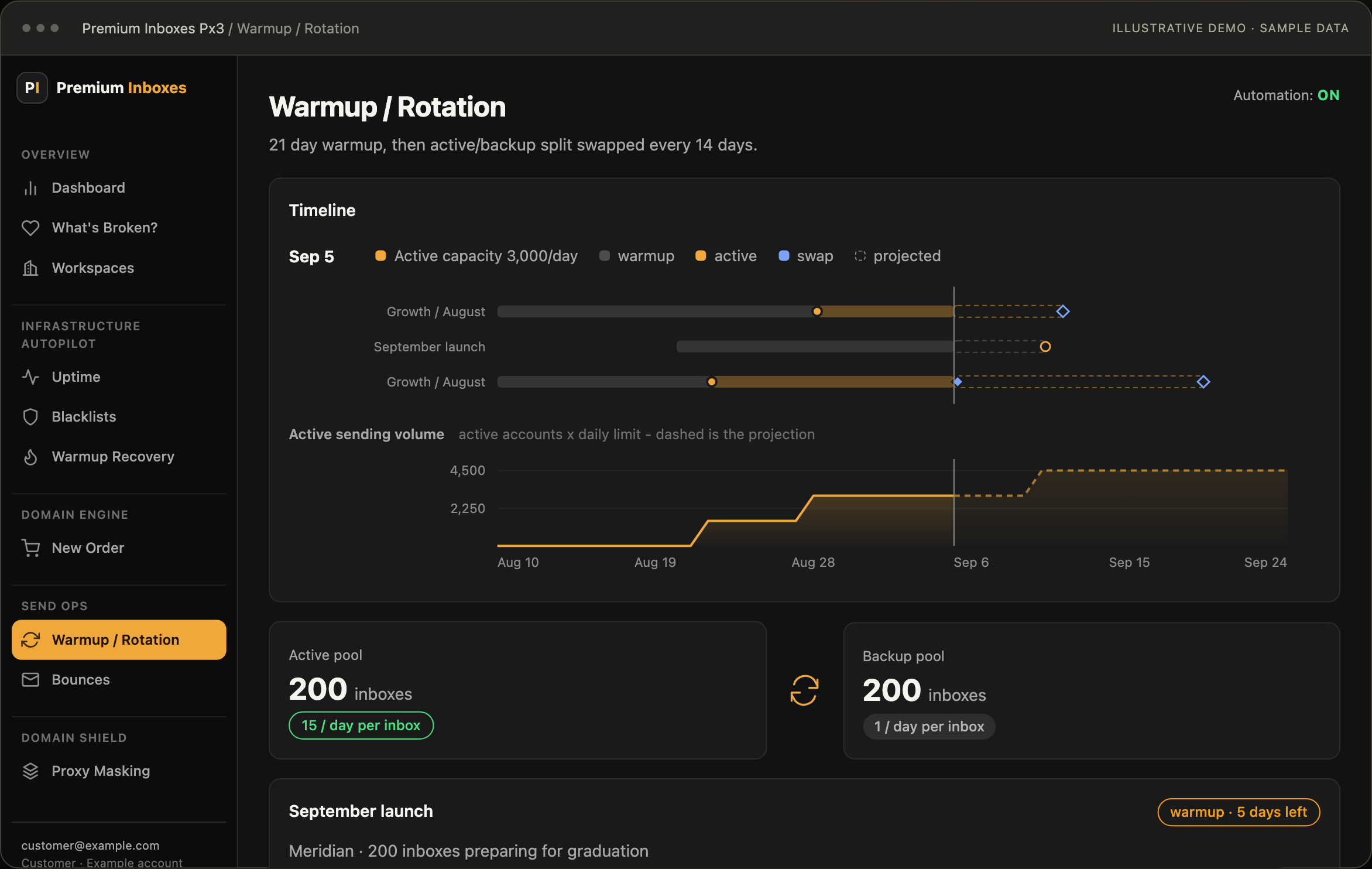
Set your rotation plan. Px3 runs the swaps and send limits on schedule. See which inboxes are warming up, which are sending, and which are next.

  • Active and backup inbox pools
  • Upcoming swaps on a timeline
  • A view of sending capacity
Watch at 0:55
Px3 rotation timeline with active and backup pools, upcoming swaps, and sending capacity, using sample data
The next swap and the capacity ahead.Open full view ↗

03 / Recovery

See which inboxes
need a break.

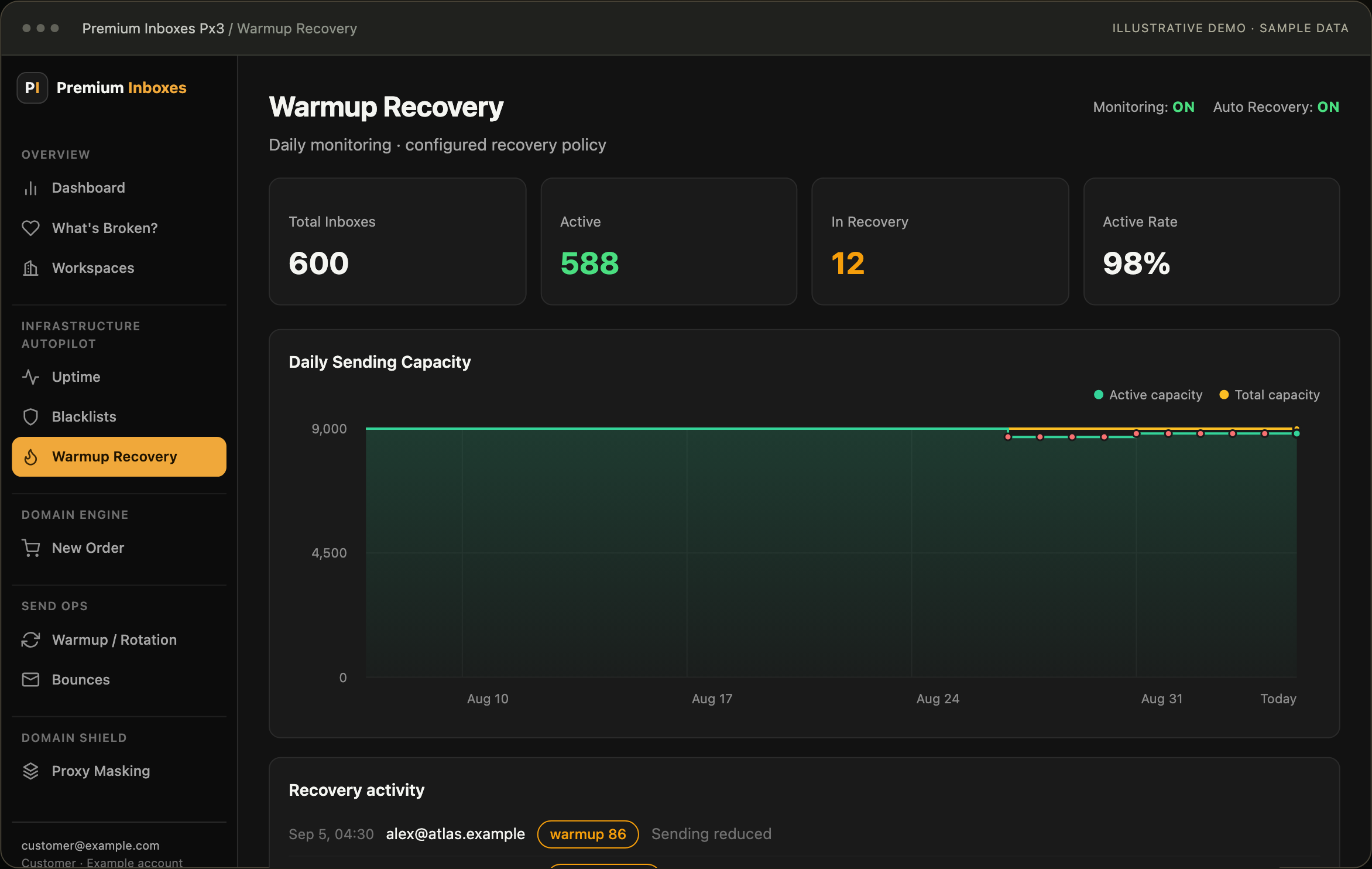
Track bounce spikes and low warmup scores. With automatic recovery on, Px3 cuts sending and manages the return under your recovery plan.

  • Inboxes in recovery
  • Sending capacity as it changes
  • A record of each action
Watch at 1:01
Px3 recovery view showing active inboxes, inboxes in recovery, sending capacity, and recent actions with sample data
Recovery activity and sending capacity.Open full view ↗

The rest of your setup is in view, too.

Proxy masking

Your site on your sending domains.

Show your site on each chosen domain. See which domains are masked, forwarding, or need a check.

Blacklist checks

Know what was flagged.

See domain check results and scan history. Bring the findings into the review before deciding what needs to change.

Bounce insights

See why emails bounced.

Review rejection types, DNS findings, and repeat issues. Give your team more to work with than a bounce count.

Orders & workspaces

Keep track as you add more.

Follow domain and inbox orders. See work across client workspaces, with the next step and owner in view.

And more to help you scale, with less to chase.

We keep building Px3.
So more can run on its own.

Our in-house algorithms check for issues. Scheduled tasks run the actions in your plan. Our team steps in when the work needs a person.

We keep adding more checks and automated actions. The goal is to put more of your inbox work on autopilot, with a clear view of what’s happening.

Built for your sequencer.
Instantly, Smartlead, Bison, PlusVibe, and many more.

See if you qualify

Get a clear next step for your inbox setup.

Who is Px3 for?

Cold email agencies and enterprise teams managing thousands of inboxes. At that scale, each issue adds more work, more checks, and more people asking for answers.

A fit for teams that:

  • Run cold email for clients or a large sales team.
  • Manage thousands of inboxes across many domains.
  • Want a clear plan and a team to handle inbox work.

Who this isn’t for.

If you’re starting out with a few inboxes or sending small, one-off campaigns, Px3 is more than you need.

Bring your setup. Tell us where your team gets stuck. We’ll see if Px3 is a fit.

Do I need to be a PI client?

Px3 is built around inboxes managed through Premium Inboxes. Book a call and we’ll check how your setup could fit.

What runs on its own, and what does PI handle?

Px3 runs scheduled checks to flag issues. Tasks like reconnection, rotation, and recovery can run under the rules set up for your team. PI reviews the findings and handles the inbox work in your agreed plan. Some changes need your approval.

Does this inbox need a rebuild or a new domain?

PI reviews the inbox and domain, then explains the next step. If an inbox needs a rebuild or a domain needs to be replaced, you can review the plan and see who’s handling the work.

Can it work with my sequencer?

Yes. We support all sequencers, including Instantly, Smartlead, Bison, PlusVibe, and many more. Tell us what you use on the call, and we’ll plan the setup with you.

Will I still run my campaigns?

You still own your offer, lists, and campaign choices. Px3 helps with the inbox setup and shows when your team has a next step.

What happens on the call?

We talk through your inbox setup and the help you need. Then we check if Px3 is a fit and explain the next step.

Premium Inboxes Px3

Put your focus back on
clients and sales.

Pick a time to talk with the Premium Inboxes team.

See if you qualify

Premium Inboxes Px3 · 45 min

See if Px3 fits your team.

Pick a time to talk through your inbox setup and the help you need.

Loading available times…

Inside Px3